Machine License
A machine license is a PDMShell license activated in the standalone PDMShell application on one workstation.
Use a machine license when PDMShell is licensed for a single computer, or when the PDMShell add-in should use the local PDMShell license already activated on that workstation.
Machine license mode is selected from Manage Licenses with Each machine's license.
When To Use A Machine License
Use Each machine's license when:
- One administrator runs PDMShell add-in automation from a licensed workstation.
- Each workstation already has its own activated PDMShell license.
- You do not want the vault to manage pooled license keys.
- You do not need to review active pool borrows from the vault.
How Activation Works
Machine license mode uses the license stored on the current computer. Activate or deactivate that license from the standalone PDMShell application settings on the workstation.
If the workstation has internet access, use License Activation. If the workstation is air-gapped or cannot reach the license server, use Offline Activation.
Activate The Local Machine License
- Open PDMShell on the workstation that will run the add-in automation.
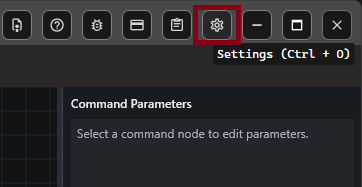
- Select
Settingson the toolbar or pressCtrl + O. - Select
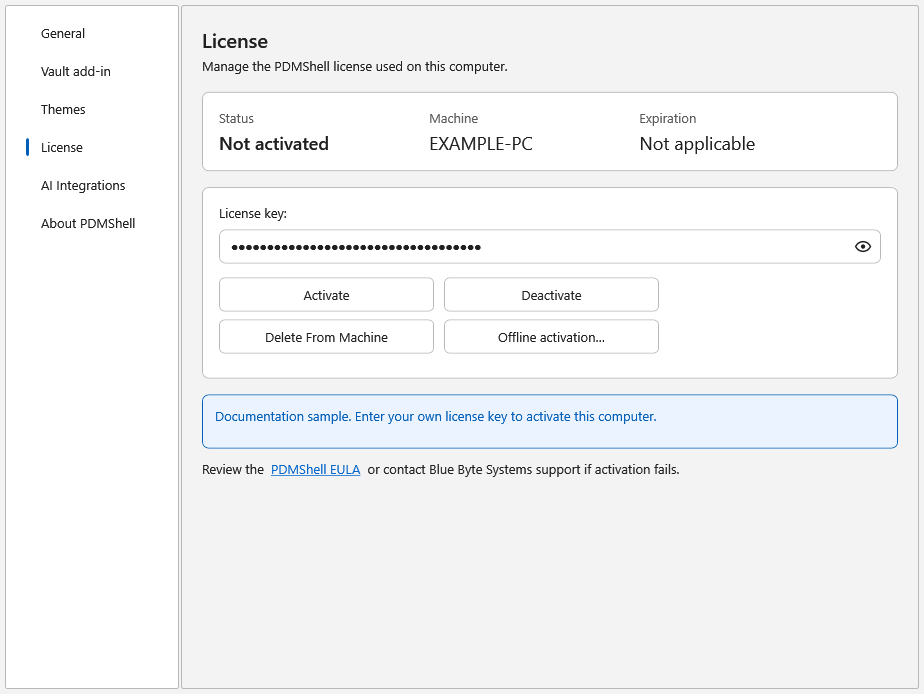
License. - Enter the PDMShell license key.
- Select
Activate.
When activation succeeds, the License page shows the active license status and expiration date. The add-in can then use Each machine's license for that workstation.
Difference From License Pool
Machine license mode does not borrow from vault-managed license keys. The add-in checks the local workstation license instead.
Vault license pools and the standalone PDMShell application have separate licensing requirements. A vault pool license does not automatically activate standalone PDMShell, and a standalone machine license does not add pooled vault seats.
For shared vault access across multiple users or machines, use a License Pool.