IF Statements And Conditions
An IF action chooses which branch of a visual script to run. Conditions Met runs when the condition is true; Else runs when it is false. Execution then continues after the IF block.
Note
Screenshots use actual controls with sample data, not a live vault.
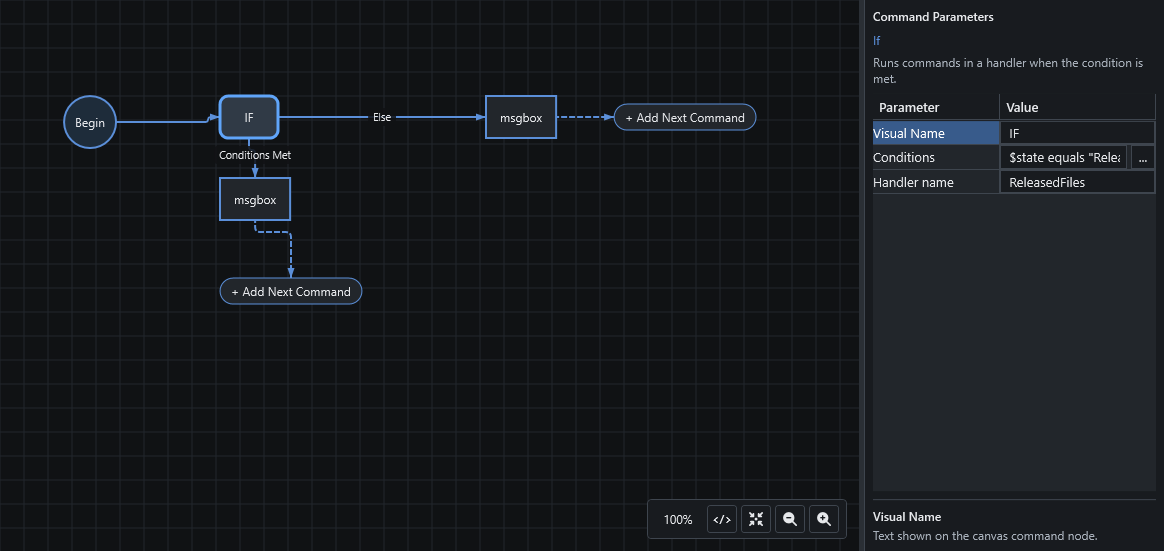
Edit an IF condition
- Add an IF action and select it on the canvas.
- Give it a readable Visual Name, such as
Released parts. - Open the Conditions property using its
…button. - Type a condition, using Ctrl+Space for function, variable, and operator suggestions. Edit example arguments before use.
- Review the automatic syntax status, then choose Apply conditions. Cancel discards the draft.
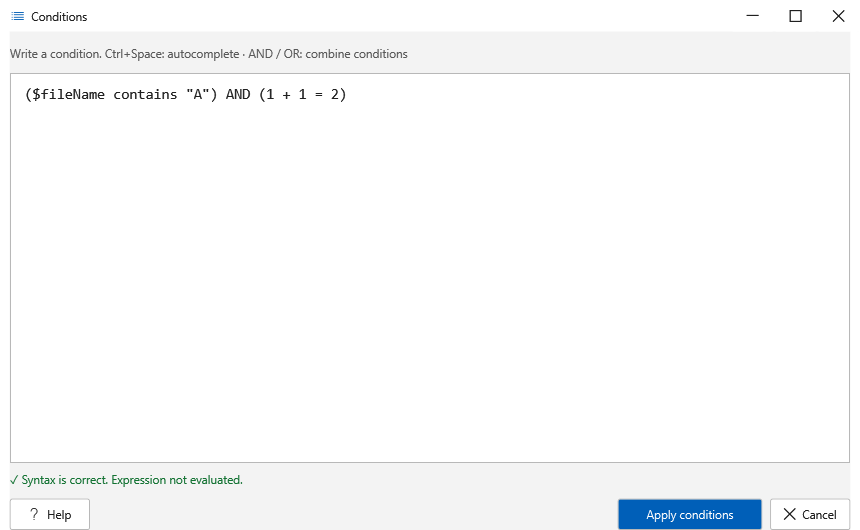
- ✓ Syntax is correct. Expression not evaluated. means the expression can be parsed. It does not mean the condition is true or that a file, variable, function argument, or workflow exists.
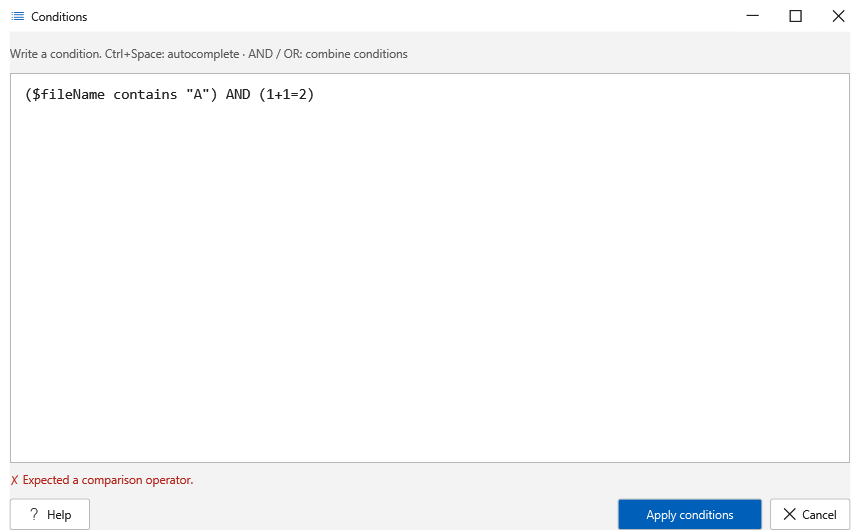
- ✗ explains a parsing problem. Correct it before applying.
- There is no separate Test or Check syntax button. Validation runs while typing and again when applying.
- Help opens this guide. Ctrl+Enter applies a valid condition.
- Syntax checking does not access the vault, display input prompts, or allocate serial numbers. Values are evaluated when the script runs.
The vault script's Script settings > Triggers > Edit conditions (N)… button shows its number of individual rules, not the number of AND/OR groups. Vault scripts opened in the main editor use this same text dialog. The vault gate additionally permits blank conditions (no condition restriction) and standalone boolean expressions. These exceptions do not change IF or until validation.
Start with this format
($fileName contains "A") AND (1 + 1 = 2)
Use spaces around comparison operators: 1 + 1 = 2, not 1+1=2. Parentheses group conditions. AND requires both conditions; OR requires either. AND takes precedence over OR; use parentheses to make the intended grouping clear.
Use $fileName for the name, $filePath for the full file path, and $folderPath for its folder. Enter normal Windows paths with single backslashes in the Conditions editor. Quote text containing spaces, parentheses, or the words and / or. Quote data-card references such as "$(Description.@)" so their parentheses are not mistaken for groups. Inside a quoted condition value, use doubled quotes for a literal quote: "Part ""A""".
IF properties and handler names
| Property | Purpose |
|---|---|
| Visual Name | Caption shown on the canvas; does not change the executable branch identifier. |
| Conditions | Expression evaluated at runtime. |
| Handler name | Identifier for the IF branch and its generated labels. |
A handler name starts with an ASCII letter or underscore, then contains letters, digits, or underscores. For example, ReleasedFiles. It must not conflict with another handler or its generated End_ label. Rename it in the property editor so the jump, end label, and nested branch mappings stay together; do not rename generated labels individually in code view.
Comparison operators
| Operator | Example |
|---|---|
equals, equal, is, =, == |
$revision equals "A" |
not equals, notequals, not-equals, !=, <> |
$state not equals "Obsolete" |
contains |
$fileName contains "ECO" |
starts with |
$fileName starts with "PRJ-" |
ends with |
$fileName ends with ".pdf" |
matches, regex |
$fileName matches "^PRJ-[0-9]+\.sldprt$" |
less than, < |
$version < 5 |
less than or equal, <= |
$version <= 5 |
greater than, > |
$version > 1 |
greater than or equal, >= |
$version >= 2 |
exists |
file exists "$filePath" |
Text comparisons are case-insensitive. Numeric arithmetic can be used on either side of a comparison. For checkout/revision functions returning true or false, write an explicit comparison such as ${isCheckedOut()} equals true in the IF text editor.
Complete placeholder reference for IF conditions
These tables cover the built-in placeholders resolved by the current generic condition runtime, followed by context-specific exceptions. Case variants are aliases, not different values. A suggested placeholder is not a guarantee that its required context exists.
File and folder
Run with selected files, folders, search results, or another item-aware run option. Running without items does not invent a current file. In a file run, the folder is the supplied parent; in a folder run, file-only metadata is unavailable.
| Placeholder and aliases | Value / requirement |
|---|---|
$filePath, $localPath, $completefilename |
Full local file path with file and parent-folder context. In a folder-only context, $localPath is the folder path; prefer $folderPath for folder checks. |
$fileName, $filename |
File name including extension. |
$name |
File name, or folder name in folder-only context. |
$fileNameWithoutExtension, $nameWithoutExtension, $namewithoutextension |
File name without its extension. |
$extension |
Extension including its dot, such as .sldprt. |
$id |
Current file ID, or folder ID in folder-only context; not a path. |
$version |
Current PDM file version. |
$revision |
Current formatted file revision, not the version number. |
$folderPath, $directory, $completefoldername |
Current folder or supplied file-parent folder path. |
$folderName |
Current folder or supplied parent folder name. |
$folderID |
Current folder or supplied parent folder ID. |
Workflow and state
To check another file, use ${workflow(12345)}, ${workflowID(12345)}, ${state(12345)}, or ${stateID(12345)}. Each accepts a file ID, complete path, or filename in the current PDM folder; no argument uses the current file. Missing targets raise an error. See workflow and state functions for the superseded-file example.
${workflow(${global.TargetDocumentID})} equals "Workflow A"
| Placeholder | Value |
|---|---|
$workflow |
Workflow name for the current file. |
$workflowID |
Workflow ID, represented as text. |
$state |
Current workflow state name for the file. |
$stateID |
Current state ID, represented as text. |
These require a PDM file. Unavailable metadata can be empty; an empty value is not proof that a workflow or state does not exist. Values are read for the current condition context and refreshed when that context refreshes, including subsequent until attempts. Merely opening the editor does not read them.
Vault, script, and user
| Placeholder and aliases | Value / requirement |
|---|---|
$vaultName, $vaultname |
Connected vault name. |
$vaultRootFolder, $vaultrootfolder |
Root of the local vault view. |
$GUID, $guid |
Identifier supplied by the script/task context; do not assume it is globally constant across runs. |
$taskName |
Task/script name supplied by its execution context; can be empty outside that context. |
$userName, $username, $userName.name |
Logged-in PDM user, not the Windows user. |
$userName.firstName |
First-name component derived from the PDM user's full name. |
$userName.lastName |
Remaining name component derived from the PDM user's full name. |
$userName.fullName |
PDM full name, with username fallback when unavailable. |
$userName.email |
PDM email when available. |
Execution computer
| Placeholder and aliases | Value |
|---|---|
$machineName, $computerName |
Computer executing the script, not necessarily the computer running an AI client. |
$windowsUser |
Windows account executing the script. |
$userDomain, $domain |
Windows user domain. |
$tempFolder, $TempFolder |
Temporary directory on the execution computer. |
Date and time
Values use the execution computer's local date/time. These formats describe IF / generic condition evaluation; older command-specific/add-in substitutions may differ. Prefer explicit formats below instead of comparing localized names when portability matters.
| Placeholder and aliases | Format / example |
|---|---|
$yyyy, $year |
Four-digit year: 2026. |
$yy |
Two-digit year: 26. |
$MM, $mm |
Two-digit month: 10. Not minutes. |
$M |
Month without leading zero: 7. |
$dd |
Two-digit day of month: 05. |
$d |
Day of month without leading zero: 5. |
$month |
Full month name, localized. |
$mon |
Abbreviated month name, localized. |
$day |
Full weekday name, localized. |
$dayShort |
Abbreviated weekday name, localized. |
$HH, $hh |
Two-digit hour on a 24-hour clock. |
$mi |
Two-digit minutes. |
$ss |
Two-digit seconds. |
$tt |
Local AM/PM designator. |
$timestamp |
yyyyMMdd_HHmmss; useful in output names. |
$date |
yyyy-MM-dd. |
$time |
HH-mm-ss. |
Variables and context-specific tokens
| Syntax | Where it works |
|---|---|
$(VariableName.Configuration) |
File data-card variable; use $(Description.@) for the file's @ tab, or an actual configuration name. Quote it in a condition. |
$(VariableName) |
Configuration-default variable lookup; for folders there is no file configuration. Use explicit file configuration when you know it. |
${global.Name} |
Global in the current PDMShell session, set with setglobal; names are user-defined. |
$value, $configuration |
Command-specific context. The generic IF runtime substitutes empty values, so do not rely on them for an IF decision; use explicit variables or session globals instead. |
$parameter1$, $parameter2$, … |
CLI launch-argument substitution, performed by the appropriate script startup path. Not independently resolved by the Conditions dialog/runtime. |
Vault script-level gate conditions additionally receive event context where supplied: $cmdType / $commandType, $cmdId / $commandId, $strData1, $strData2, $strData3, $longData1, $longData2, $buttonText, $configurationName, and event-specific $configuration. These are not universal IF placeholders. See add-in placeholders. Task-specific $taskGUID substitution likewise belongs to its task execution path; use $GUID where the generic condition context supplies it.
Copyable examples
Paste one example into the Conditions property. Adapt names, paths, IDs, configuration names, and revision component names to your vault. These examples do not run a command by themselves; the selected branch contains the actions to execute.
File names and paths
Only SOLIDWORKS parts:
$extension equals ".sldprt"
Parts or assemblies, but not drawings:
($extension equals ".sldprt") OR ($extension equals ".sldasm")
Project prefix and filename suffix:
($fileName starts with "PRJ-") AND ($fileName ends with ".pdf")
Only a project subfolder (normal single-backslash Windows path):
$filePath contains "\Projects\"
Match a part-number filename with a regular expression:
$fileName matches "^PRJ-[0-9]{4}\.sldprt$"
The current file exists locally:
file exists "$filePath"
A related PDF exists locally in an Export subfolder:
file exists "$folderPath\Export\$fileNameWithoutExtension.pdf"
A specific output directory exists:
folder exists "C:\PDM Exports\Released"
SOLIDWORKS is running on this execution computer:
process exists "SLDWORKS"
Existence checks inspect the execution computer's filesystem/processes; they do not automatically download a vault file or prove that a vault search would find it.
Workflow, state, version, and variables
File is Released in the Engineering workflow:
($workflow equals "Engineering") AND ($state equals "Released")
Match workflow/state IDs (replace these example IDs):
($workflowID = 23) AND ($stateID = 17)
Require a later version and a nonempty revision:
($version >= 2) AND ($revision not equals "")
Require a data-card description and numeric quantity:
("$(Description.@)" not equals "") AND ("$(Quantity.@)" > 0)
Read a named SOLIDWORKS configuration:
"$(PartNumber.Default)" starts with "PRJ-"
Read a folder variable in a folder-aware run:
"$(ProjectNumber)" equals "PRJ-1000"
Checkout ownership
File is checked out by the current PDM user:
(${isCheckedOut()} equals true) AND (${isCheckedByMe()} equals true)
File is checked out by a specific PDM user:
${isCheckedOutByUsername("Admin")} equals true
Checkout is on the execution computer:
${checkedOutOnComputer()} equals "$machineName"
Inspect a different vault file by path:
${isCheckedOut("C:\Vault\Projects\Bracket.sldprt")} equals true
Missing files/API failures can produce false or empty checkout values. Do not treat ${isCheckedOut()} equals false as proof that a file exists or that a write operation is permitted.
Strings, regex, and arithmetic functions
Normalize text before comparing:
${upper($fileNameWithoutExtension)} starts with "PRJ-"
Test the length of a file's base name:
${len($fileNameWithoutExtension)} >= 8
Extract the text before a delimiter:
${before($fileNameWithoutExtension, "-")} equals "PRJ"
Extract a regex capture (function extraction is case-sensitive unless the pattern adds an option):
${regex($fileName, "(?i)^PRJ-([0-9]+)", 1)} not equals ""
Arithmetic on a card variable:
${mul($(Quantity.@), 2)} >= 10
Read a local lookup CSV's second-column value for a first-column key:
${lookup("C:\PDM Config\routing.csv", "PRJ-1000")} equals "Approved"
Revision scheme checks
Check that the current file has an assigned revision scheme:
${hasRevisionScheme()} equals true
Check whether a proposed revision fits the file's assigned scheme:
${isRevisionValueValid("B.1")} equals true
Check a named revision component's counter (replace Major with a name from ${revisionComponents()}):
${revisionComponentCounter("Major")} >= 2
Compare the calculated next revision without changing it:
${nextRevision()} equals "B"
Session, user, and time
Use a session global set earlier in the script:
${global.ExportEnabled} equals "true"
Restrict a branch to a named vault and PDM user:
($vaultName equals "Engineering") AND ($userName equals "Admin")
Match an email domain:
$userName.email ends with "@example.com"
Run a branch during business hours on the execution computer:
($hh >= 9) AND ($hh < 17)
Check the first fifteen minutes of each hour:
$mi < 15
Function reference and safety
Functions use ${function(arguments)}. See Placeholders and functions for arguments, aliases, error behavior, and examples.
| Family | Functions |
|---|---|
| Text | upper, lower, left, right, len, pos, replace, before, after |
| Regex | regex (extracts a match/capture); regexReplace (replaces matches) |
| Arithmetic | inc / increment, dec / decrement, add, sub / subtract, mul / multiply, div / divide |
| Lookup | lookup |
| Checkout | isCheckedOut, isCheckedByMe / isCheckedOutByMe, isCheckedOutByUsername, checkedOutOnComputer |
| Revision | revision, nextRevision, revisionComponentValue, nextRevisionComponentValue, revisionComponentCounter, nextRevisionComponentCounter, revisionNumberName, revisionNumberId, revisionComponents, hasRevisionScheme, canIncrementRevision, isRevisionValueValid |
| Interactive / state-changing | input, serialNumber / serialNbr — avoid these in conditions that run repeatedly. |
Warning
Syntax validation never calls functions. Runtime evaluation can. input can display a blocking prompt; serialNumber allocates a new number on every evaluation. Do not use them in repeatedly evaluated conditions (especially until). If needed, obtain a value once in an intentional action, store it in a session global, then compare that global. nextRevision calculates a value; it does not update the file.
Troubleshooting
| Symptom | Check |
|---|---|
| Expected a comparison operator | Put spaces around =, >, etc. Use ${isCheckedOut()} equals true, not a bare function, in the IF editor. |
| Unexpected token or unmatched parenthesis | Balance condition groups and quote data-card references / literal text containing parentheses. |
| Green check but wrong result at runtime | Syntax is not a result test. Check the run's file/folder context and resolved values. |
| Workflow/state is empty | Supply a PDM file context and confirm its metadata is accessible. |
| File does not exist | Check the local cached path on the execution computer, not just the archive/vault entry. |
| Minute condition behaves like a month | Use $mi for minutes; $mm / $MM are month in generic conditions. |