Conditions
The Conditions section controls whether a script should run for the current file, folder, or command context.
Conditions use the shared PDMShell condition syntax. See Conditions for the full reference.
Use the Conditions editor to add condition rows, combine them with and or or, group expressions, and review the generated condition expression before saving the add-in script.
In the 4.0.85 main editor, open a vault script, then choose Script settings > Triggers > Edit conditions…. Click OK to update the draft's condition expression, then Save in the main toolbar to publish the script and settings.
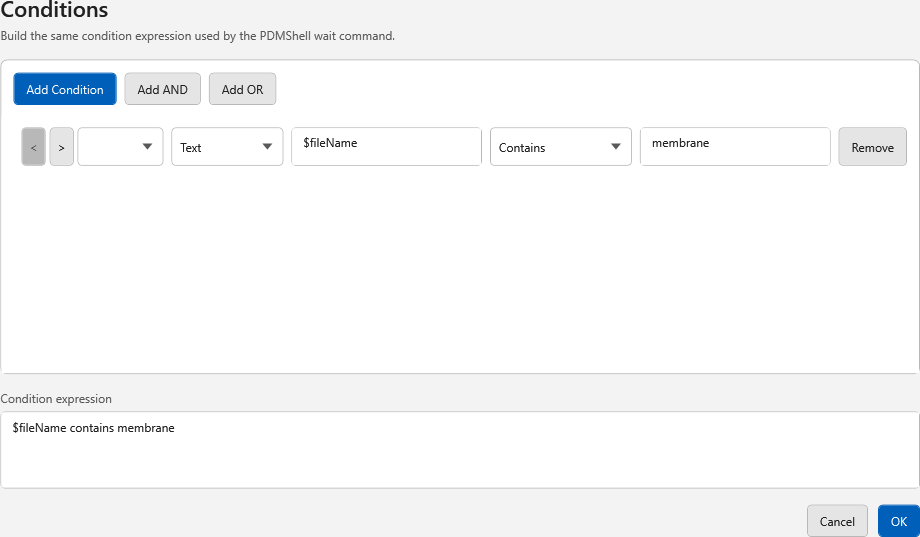
Supported condition features
andandor- nested groups with parentheses
- file, folder, and process exists checks
- text comparisons such as equals, contains, starts with, ends with, and regex matches
- numeric comparisons
- PDMShell placeholders such as
$fileName,$localPath, and$folderPath - PDM variables such as
$(Description.@)or$(Revision.@)for file@tab values - checkout functions such as
${isCheckedOut()},${isCheckedByMe()},${isCheckedOutByUsername("Admin")}, and${checkedOutOnComputer()}
Examples
$localPath exists
"$(Description.@)" contains "ECO"
($folderPath\ready.pdf exists or $folderPath\ready.dxf exists) and "$(State.@)" equals "Released"
${isCheckedOut()} and ${isCheckedByMe()}
${isCheckedOutByUsername("Admin", "$filePath")}
For file data card variables, use the explicit configuration suffix. Use .@ for the file @ tab, for example $(Description.@).
Checkout functions are evaluated against each affected file when the menu command, event hook, or task runs. They are available from the Conditions editor autocomplete list. See Checkout state functions for optional file-path forms.
Condition test message
Enable Always show condition test message while building a script. This displays the condition expression and resolved values so you can confirm what PDM is passing into the script context.