Placeholders in PDMShell
Overview
Placeholders in PDMShell let you substitute values at runtime. Supported commands can use file or folder properties, system values, vault context, PDM variables, and other contextual information to generate values automatically.
Placeholders are not a standalone command. They are evaluated by supported commands when processing the value parameter or other relevant inputs.
Commands Supporting Placeholders
The following commands support placeholders:
Commands Using the Current Folder as the Backing Object (directory parameter):
cd: Change the current directory.mkdir: Create a new directory.export: Export commands to a file.addtovault: Add files to the vault with the directory as the backing object.
Commands Using Files or Folders as the Backing Object:
rename: Uses thevalueparameter for renaming files or folders.renamefromsource: The new file is evaluated if theevaluatealiasesparameter is specified.setvar: Uses thevalueparameter to set variables for files or folders.bom: Uses thenameparameter to set the exported bom csv name.export: Uses thenameparameter to set the exported files name pattern.
Placeholder Reference
The value parameter in supported commands can include placeholders that are replaced with actual values based on the current context. The placeholders differ slightly depending on whether the backing object is a file or a folder.
Placeholders for Files
$value: Existing value of the variable. If the existing value is null or empty, this evaluates to an empty string.$name: The file name with extension.$fileName/$filename: The file name with extension.$fileNameWithoutExtension: The file name without extension.$nameWithoutExtension/$namewithoutextension: The file name without extension.$extension: The file extension.$id: The file ID.$revision: The current revision of the file (PDM revision, not the PDM variable).$version: The current version of the file.$state: The current workflow state name of the file.$stateID: The current workflow state ID of the file.$workflow: The workflow name for the file's current state.$workflowID: The workflow ID for the file's current state.$filePath: The full local path of the file.$localPath: The full local path of the file.$completefilename: Legacy full local path of the file.$folderPath: The full local path of the folder containing the file.$directory: The full local path of the folder containing the file.$completefoldername: Legacy full local path of the folder containing the file.$folderName: The name of the folder containing the file.$folderID: The folder ID.$configuration: configuration name. Only valid for BOM command.$(Variable.@): PDM file variable value from the file@tab. The.@suffix is required when reading file variables from the@tab.$(Variable.Configuration): PDM file variable value from an explicit configuration tab.
Placeholders for Folders
$value: Existing value of the variable. If the existing value is null or empty, this evaluates to an empty string.$folderName: The name of the parent folder.$folderID: The folder ID.$folderPath: The full local path of the folder.$directory: The full local path of the folder.$filePath: The full local path of the folder when the current context is a folder.$localPath: The full local path of the folder.$completefoldername: Legacy full local path of the folder.$(Variable): PDM variable value using the default folder configuration.$(Variable.Configuration): PDM variable value from an explicit configuration.
Common Placeholders (Applicable to Both Files and Folders)
$username: The name of the logged-in PDM user.$username.firstName: The logged-in PDM user's first name when available.$username.lastName: The logged-in PDM user's last name when available.$username.FullName: The logged-in PDM user's full name when available.$username.email: The logged-in PDM user's email address when available.$vaultName: The name of the vault.$vaultnameis also supported for compatibility.$vaultRootFolder: The local root folder of the logged-in vault.$vaultrootfolderis also supported for compatibility.$GUID/$guid: Unique identifier for the evaluation context.$taskName: Task name when a task context is available.$tempFolder/$TempFolder: User's local temporary folder.$machineName/$computerName: Windows machine name.$windowsUser: Windows user name.$userDomain/$domain: Windows user domain.$yyyy/$year: The current four-digit year.$yy: The current two-digit year.$MM/$mm: The current month (two digits).$M: The current month.$dd: The current day of month (two digits).$d: The current day of month.$month: Full month name.$mon: Short month name.$day: Full day name.$dayShort: Short day name.$HH/$hh: The current hour (24-hour clock).$mi: The current minute (two digits).$ss: The current second (two digits).$tt: AM/PM designator.$timestamp: Timestamp inyyyyMMdd_HHmmssformat.$date: The current date.$time: The current time in the current locale.
Literal \n sequences in evaluated values are converted to Environment.NewLine.
PDM variable expressions use $(VariableName) or $(VariableName.ConfigurationName). Bracketed text is treated as literal text, so folder and file paths such as [debugging] are not interpreted as variables.
For file data card variables, include the configuration suffix. Use .@ for the file @ tab, for example $(Description.@) or $(Revision.@). Use the explicit configuration name for a named tab, for example $(PartNo.Default). Folder variables can use $(VariableName) because folders do not use file configurations.
Global Variables
Session global variables use the ${global.Name} syntax. They are set with setglobal, printed with getglobal, and cleared with clearglobal.
setglobal -name Project -value "ABC-100"
rename -filePath "$localPath" -value "${global.Project}-$name"
setvar -variableName Description -filePath "$localPath" -value "${global.Project} - $value"
Global variables are temporary and last only for the current PDMShell session or script run. See Global Variables.
String Functions
Placeholders also support a small set of string functions. Functions are evaluated after placeholders such as $value, $name, and PDM variable expressions like $(Description.@) have been resolved, so they can be used to manipulate the evaluated text.
String functions use the ${...} syntax:
${left($value, 5)}
${replace($fileNameWithoutExtension, " ", "_")}
${before($fileNameWithoutExtension, "-")}
${regex($fileNameWithoutExtension, "^([^-]+)-", 1)}
${add($id, 5)}
${inc(${regex($value, "^([^-]+)-(\d+)\((\d+)\)$", 2)})}
${lookup("C:\Vault\lookup.csv", $value)}
$input("Title", "Message")
$input("Title", "Message", "Default value")
${input("Title", "Message")}
${input("Title", "Message", "Default value")}
${serialNumber("SerialNumberName")}
Supported functions:
| Function | Description |
|---|---|
${left(value, count)} |
Returns the first count characters. If count is longer than the value, the whole value is returned. |
${right(value, count)} |
Returns the last count characters. If count is longer than the value, the whole value is returned. |
${len(value)} |
Returns the number of characters in value. |
${pos(value, search)} |
Returns the zero-based position of search in value, or -1 when it is not found. |
${replace(value, old, new)} |
Replaces all occurrences of old with new. |
${before(value, search)} |
Returns the text before search. If search is not found, the original value is returned. |
${after(value, search)} |
Returns the text after search. If search is not found, an empty string is returned. |
${regex(value, pattern)} |
Returns the first regular expression match. If no match is found, an empty string is returned. |
${regex(value, pattern, group)} |
Returns a capture group from the first regular expression match. group can be a group number or group name. If the group is not found, an empty string is returned. |
${inc(value)} |
Increments a number by 1. |
${inc(value, amount)} |
Increments a number by amount. |
${dec(value)} |
Decrements a number by 1. |
${add(left, right)} |
Adds two numbers. |
${sub(left, right)} |
Subtracts right from left. |
${mul(left, right)} |
Multiplies two numbers. |
${div(left, right)} |
Divides left by right. Division by zero is invalid and the expression is left unchanged. |
${lookup(csvPathOrPdmFileId, value)} |
Reads a CSV file, finds value in the first column, and returns the matching value from the second column. |
$input(title, message[, defaultValue]) |
Prompts the user for a value when the command line is evaluated. defaultValue is optional and pre-fills the text box. |
${input(title, message[, defaultValue])} |
Same as $input(title, message[, defaultValue]), using the standard function expression syntax. |
${serialNumber(name)} |
Allocates and returns the next value from the named SOLIDWORKS PDM serial number. |
${isCheckedOut([filePath])} |
Returns true when the current file, or the optional file path, is checked out. |
${isCheckedByMe([filePath])} |
Returns true when the current PDM user has the current file, or the optional file path, checked out. ${isCheckedOutByMe(...)} is also accepted. |
${isCheckedOutByUsername(userName[, filePath])} |
Returns true when the named PDM user has the current file, or the optional file path, checked out. |
${checkedOutOnComputer([filePath])} |
Returns the checkout computer for the current file or optional file path. Returns an empty value when the file is not checked out. |
Checkout State Functions
Checkout functions use the selected PDM file unless a path is supplied. A relative path is resolved from the current PDM folder. An absolute path can identify another file in the logged-in vault.
${isCheckedOut()}
${isCheckedOut("Drawing.slddrw")}
${isCheckedByMe("$folderPath\\Drawing.slddrw")}
${isCheckedOutByUsername("Admin", "C:\\Vault\\Projects\\Drawing.slddrw")}
${checkedOutOnComputer()}
The boolean functions return lowercase true or false. They can be used in command values, visual IF statements, until, and PDMShell add-in conditions.
String functions can be nested when the nested function also uses ${...}:
${left(${replace($value, " ", "_")}, 10)}
For example, if $value is ABC 123 DRAFT, the expression above evaluates to ABC_123_DR.
Arithmetic functions use invariant number parsing. Integer results preserve leading zero padding from the first argument, so ${inc("032")} evaluates to 033. They can also use numeric placeholders, so ${add($id, 5)} adds 5 to the selected file or folder ID.
You can combine regex with arithmetic functions when a value contains counters inside a larger string. For example, if $value is vA4-32(74), this expression increments both counters while preserving the prefix:
${regex($value, "^([^-]+)-(\d+)\((\d+)\)$", 1)}-${inc(${regex($value, "^([^-]+)-(\d+)\((\d+)\)$", 2)})}(${inc(${regex($value, "^([^-]+)-(\d+)\((\d+)\)$", 3)})})
The result is:
vA4-33(75)
Tip
Regex is useful for advanced naming and value parsing, but complex expressions should be tested carefully in the Expression Evaluator. If your team needs help building or reviewing complex PDMShell expressions, Blue Byte Systems offers Enterprise Support Services.
Unknown or invalid function expressions are left unchanged.
When a full command value is wrapped in double quotes, escape quotes inside function arguments with \".
Input Function
Use $input("Title", "Message") when a script needs a value from the user at runtime. PDMShell shows a prompt with a text box and an OK button. The typed text becomes the evaluated value.
setvar -filePath "$localPath" -variableName Description -value "$input(\"Description\", \"Enter the new description\")"
Add a third argument when the prompt should start with a default value:
setvar -filePath "$localPath" -variableName Description -value "$input(\"Description\", \"Enter the new description\", \"Needs review\")"
You can also use the standard ${...} function form:
setvar -filePath "$localPath" -variableName Description -value "${input(\"Description\", \"Enter the new description\")}"
If the user closes the input prompt without clicking OK, the function returns an empty string. PDMShell warns before clearing the return value; users can suppress that warning with Do not show this again.
Important
$input(...) is evaluated every time the expression is processed. If you use it in a command that processes multiple files, PDMShell can prompt once per file.
Use $input(...) for interactive PDMShell sessions. Avoid it in unattended or headless automation because the script will wait for user input.
Lookup Function
Use ${lookup(csvPathOrPdmFileId, value)} when a script needs to translate one value into another from a two-column CSV file.
The first column is the lookup key. The second column is the returned value.
Code,Description
A100,Bracket
B200,Cover
setvar -filePath "$localPath" -variableName Description -value "${lookup(\"C:\Vault\lookup.csv\", $(Code.@))}"
If $(Code.@) evaluates to A100, the expression returns Bracket.
You can also combine literal text with a lookup result. This example reads Lookup.csv, finds key 4 in the first column, and inserts the matching second-column value into a message box:
msgbox -value "speaker_frame-${lookup(\"C:\SOLIDWORKSPDM\Assemblageddon\Lookup.csv\", 4)}" -icon "Information"
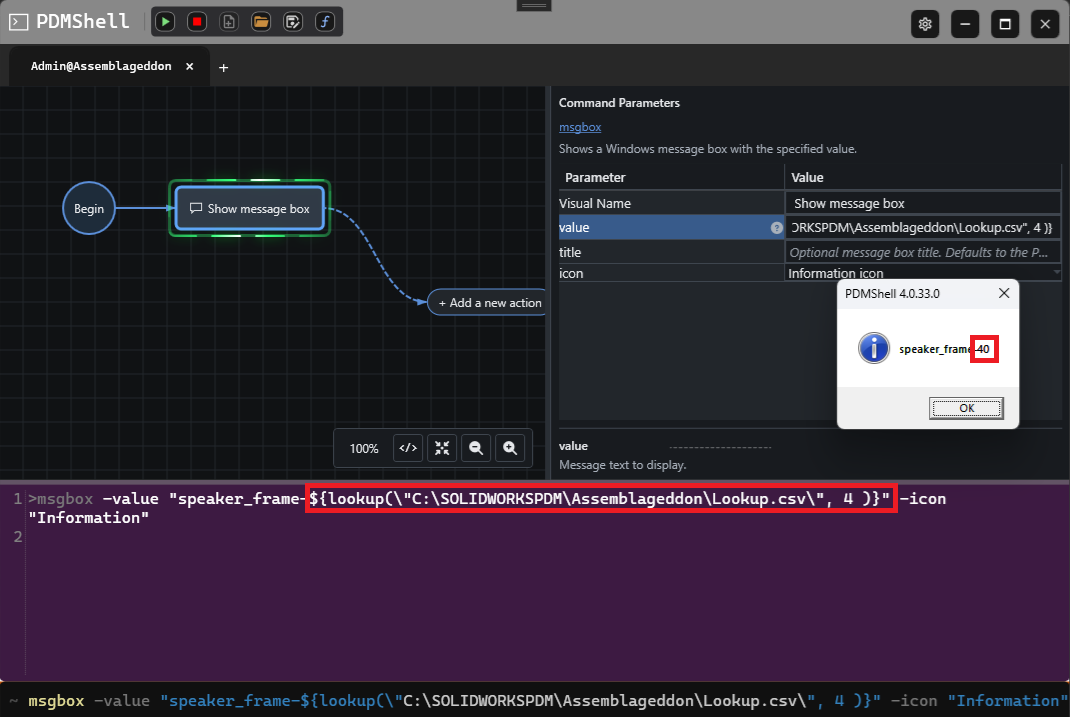
The CSV argument can be a local path, a path relative to the current vault folder, or the PDM file ID of a CSV file:
setvar -filePath "$localPath" -variableName Description -value "${lookup(12345, $(Code.@))}"
If the CSV file exists but the first-column value is not found, the function returns an empty string. If the CSV file path or PDM file ID cannot be resolved, the expression is left unchanged so the problem is visible in the output.
Serial Number Function
Use ${serialNumber("SerialNumberName")} when a command or script needs the next value from a SOLIDWORKS PDM serial number.
setvar -filePath "$localPath" -variableName Number -value "${serialNumber(\"PartNumber\")}"
Warning
${serialNumber("SerialNumberName")} allocates a real PDM serial number every time the expression is evaluated. Avoid testing this repeatedly against a production serial number. If the expression is used in a command that processes multiple files, one serial number is allocated for each evaluated item.
Revision Functions
Revision functions use the same ${...} syntax as string functions. Without a path argument, they require a selected PDM file because the result depends on the file's active workflow state and revision scheme.
Most revision functions also accept an optional file path. Use this when the expression needs to inspect a different PDM file, such as a released PDF that is related to the current SOLIDWORKS file.
Use the display value functions for normal scripts. Counter functions expose the internal numeric position of a revision component and are intended for advanced cases.
Current and next revision display functions use the active PDM revision scheme format. For example, letter components, zero-padded numeric components such as 016, hexadecimal components, and date/time components are formatted the same way PDM displays them.
| Function | Description |
|---|---|
${revision()} |
Returns the current full PDM revision display value for the selected file. |
${revision("filePath")} |
Returns the current full PDM revision display value for another PDM file. |
${nextRevision()} |
Returns the next full PDM revision display value based on the selected file's active revision scheme. |
${nextRevision("filePath")} |
Returns the next full PDM revision display value for another PDM file. |
${revisionComponentValue("ComponentName")} |
Returns the current displayed value for a specific revision component. |
${revisionComponentValue("ComponentName", "filePath")} |
Returns the current displayed value for a component on another PDM file. |
${nextRevisionComponentValue("ComponentName")} |
Returns the next displayed value for a specific revision component. |
${nextRevisionComponentValue("ComponentName", "filePath")} |
Returns the next displayed component value for another PDM file. |
${revisionComponentCounter("ComponentName")} |
Returns the current internal numeric counter for a specific revision component. |
${revisionComponentCounter("ComponentName", "filePath")} |
Returns the current internal numeric counter for a component on another PDM file. |
${nextRevisionComponentCounter("ComponentName")} |
Returns the next internal numeric counter for a specific revision component. |
${nextRevisionComponentCounter("ComponentName", "filePath")} |
Returns the next internal numeric component counter for another PDM file. |
${revisionNumberName()} |
Returns the name of the active revision number scheme for the selected file. |
${revisionNumberName("filePath")} |
Returns the active revision number scheme name for another PDM file. |
${revisionNumberId()} |
Returns the internal ID of the active revision number scheme for the selected file. |
${revisionNumberId("filePath")} |
Returns the internal active revision number scheme ID for another PDM file. |
${revisionComponents()} |
Returns a comma-separated list of active revision component names for the selected file. |
${revisionComponents("filePath")} |
Returns a comma-separated list of active revision component names for another PDM file. |
${hasRevisionScheme()} |
Returns true when the selected file's current workflow state has a revision scheme configured. |
${hasRevisionScheme("filePath")} |
Returns true when another PDM file's current workflow state has a revision scheme configured. |
${canIncrementRevision()} |
Returns true when PDM reports that the selected file can increment revision in the current state. |
${canIncrementRevision("filePath")} |
Returns true when PDM reports that another PDM file can increment revision in the current state. |
${isRevisionValueValid("A")} |
Returns true when the supplied value matches the active revision scheme component structure. |
${isRevisionValueValid("A", "filePath")} |
Returns true when the supplied value matches another PDM file's active revision scheme component structure. |
Examples:
msgbox -value "Current revision: ${revision()}"
msgbox -value "Next revision: ${nextRevision()}"
setvar -variableName NextRevision -filePath "$localPath" -value "${nextRevision()}"
msgbox -value "Related PDF revision: ${revision(\"$folderPath\\$fileNameWithoutExtension.pdf\")}"
Expression Evaluator
Use the Expression Evaluator to preview placeholders, PDM variables, and string functions before running a command or script.
Using PDM Variables in Placeholders
In addition to named placeholders, you can include PDM variables with $() expressions.
$(Revision.@)
$(Description.@)
$(PartNo.Default)
For file variables, include the configuration suffix. Use .@ for the file @ tab.
Bracket syntax is not evaluated. Anything between [ and ] remains literal text.
Example Usage
Here is an example of how to use placeholders in a command:
Renaming a File
rename -filePath 1.sldprt -value "$fileNameWithoutExtension_$yyyy$mm$dd$extension"
Updating a Variable From Its Current Value
setvar -filePath file1.sldprt -variableName Description -value "${replace($value, \"DRAFT\", \"RELEASED\")}"
Renaming With Nested String Functions
rename -filePath "Part 123 Draft.sldprt" -value "${left(${replace($fileNameWithoutExtension, \" \", \"_\")}, 12)}$extension"
Renaming Everything Before a Separator
rename -filePath "ABC-123.sldprt" -value "${before($fileNameWithoutExtension, \"-\")}$extension"
Renaming With a Regular Expression
rename -filePath "ABC-123.sldprt" -value "${regex($fileNameWithoutExtension, \"^([^-]+)-\", 1)}$extension"