Expression Evaluator
The Expression Evaluator lets you test dynamic values before you run a command, script, task, or rename rule.
Use it when you want to confirm what a placeholder, PDM variable, or string function will become at runtime.
How Evaluation Works
The evaluator combines three things:
| Input | What It Controls | Examples |
|---|---|---|
| Context path | The selected PDM file or folder used by placeholders and variables. | $fileName, $folderPath, $id, $(Description.@), ${revision()} |
$value source |
Where $value comes from. |
Sample text, or a selected PDM variable |
| Expression | The placeholder or function you want to test. | ${before(...)}, ${regex(...)}, ${add(...)} |
Most expressions only read values; evaluating them does not write the result back to PDM. Functions with side effects, such as allocating a serial number, are exceptions; see the warning below before evaluating them.
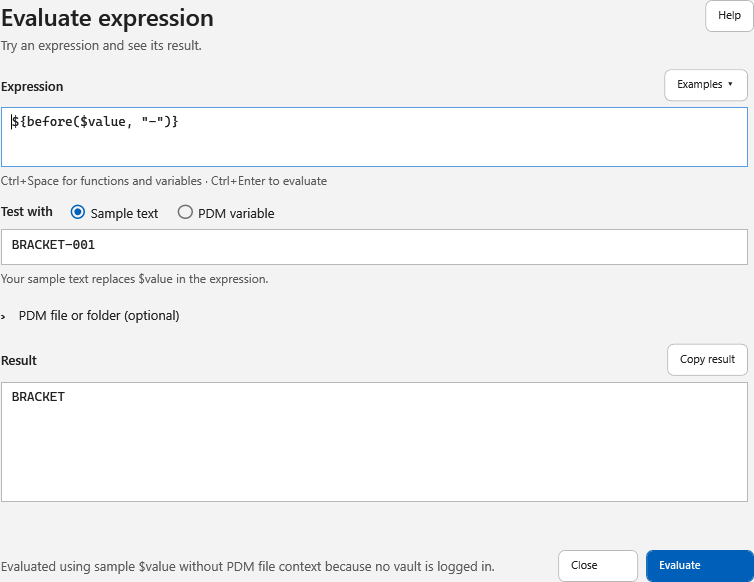
Screenshots show the 4.0.85 controls. The sample-text example below is evaluated without a vault. Images labeled Illustrative sample result demonstrate a result format, not a live vault query; your results depend on your vault and selected context.
Context Path
Use the context path when the expression needs a selected PDM object.
| Context | Use It For | Examples |
|---|---|---|
| PDM file | File name placeholders, file data card variables, revision functions, file ID/version/revision values. | $fileNameWithoutExtension, $filePath, $extension, $id, $(Description.@), ${revision()} |
| PDM folder | Folder placeholders, folder data card variables, folder ID values. | $folderPath, $folderName, $directory, $folderID, $id, $(Project) |
| No file or folder | Sample text, date/time placeholders, vault/user placeholders, and functions that do not need a file or folder. | $date, $vaultName, ${inc("032")}, ${regex($value, "...", 1)} |
Revision functions require a file context unless you pass a full file path into the function.
$value Source
$value is the test input used by expressions such as ${replace($value, ...)} or ${regex($value, ...)}.
Choose one source:
| Source | What It Does | When To Use It |
|---|---|---|
| Sample text | Uses the text you type in the evaluator. | Testing regex, arithmetic, and string functions against an example value. |
| PDM variable | Reads the current value of a selected data card variable from the selected file or folder. | Testing the same expression a command like setvar will use. |
When PDM variable is selected, the configuration box applies to file variables. Use @ for the file @ tab. Folder variables do not use configurations.
Basic Workflow
Since 4.0.88, use ${upper($value)} or ${lower($value)} to change casing explicitly. With sample text MiXeD Part, plain $value remains unchanged; the functions return MIXED PART and mixed part. They use invariant casing, independent of workstation language settings.
- Select Evaluate in the main toolbar.
- Enter sample text, such as
BRACKET-001. The starting expression is$value. - Type an expression, or choose one from Examples. Selecting an example does not run it.
- Select Evaluate, or press Ctrl+Enter.
- Review the result and use Copy result to copy a successful, nonempty result.
- Select Close when finished. Evaluation does not save a script or write the displayed result to a data card.
For a vault-dependent expression, expand PDM file or folder (optional) and choose its context. Select PDM variable when $value should come from a data card instead of sample text. The variable and configuration controls remain available in this mode.
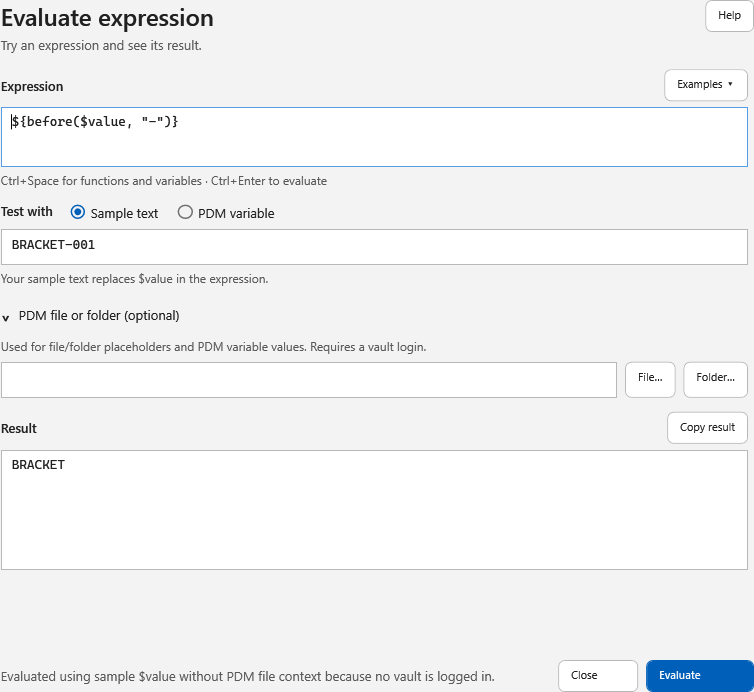

The evaluator window shows the selected file or folder context, the selected $value source, the expression being tested, and the evaluated result.
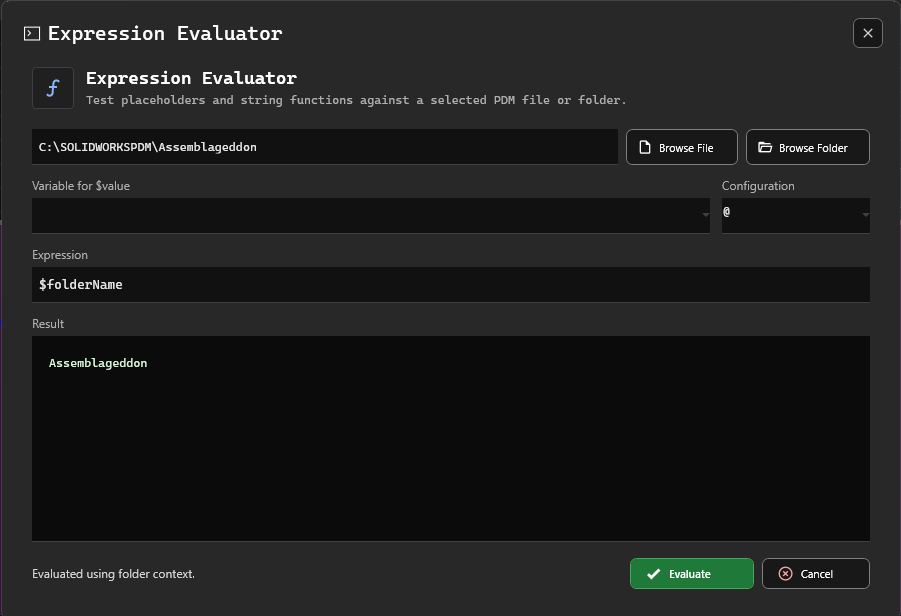
The expression box supports multiple lines and Ctrl+Space autocomplete for file, folder, workflow, vault, user, date, variable, and function expressions. File workflow suggestions include $state, $stateID, $workflow, and $workflowID. The body scrolls in smaller windows; Evaluate and Close stay in the footer.
File Context Examples
Preview A File Placeholder
Choose a PDM file when you want to test file placeholders.
$fileNameWithoutExtension
For a selected file named Bracket-001.SLDPRT, this returns:
Bracket-001
Preview A File Data Card Variable
Use $() expressions when you want to read a file data card variable. Use .@ to explicitly select the file @ tab:
$(Description.@)
Use the explicit configuration name for a named configuration tab:
$(PartNo.Default)
Keep Text Before A Separator
Use ${before(...)} when a file name has a predictable separator and you want the left side.
${before($fileNameWithoutExtension, "-")}
For Bracket-001, this returns:
Bracket
Folder Context Examples
Preview Folder Path Or Name
Choose a PDM folder when you want to test folder placeholders.
$folderPath
This returns the selected folder path.
$folderName
This returns the selected folder name.
Preview Folder ID
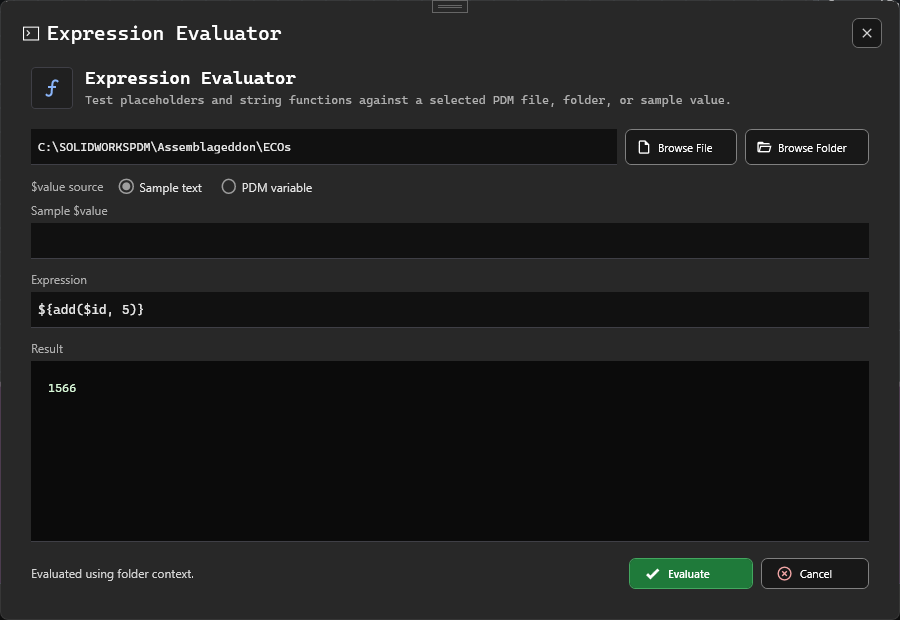
$id resolves to the selected folder ID when the context path is a folder.
$id
Add To A Folder ID
Arithmetic functions can use numeric placeholders. For example, ${add($id, 5)} adds 5 to the selected folder ID.
${add($id, 5)}
Preview A Folder Data Card Variable
Choose PDM variable as the $value source, select a folder data card variable, and evaluate $value directly:
$value
You can also transform the folder variable value:
${replace($value, "DRAFT", "RELEASED")}
$value Examples
Replace Text In The Current Value
Choose PDM variable as the $value source when you want $value to come from the selected variable. Then use ${replace(...)} to test how a command such as setvar would transform it.
${replace($value, "DRAFT", "RELEASED")}
If $value is FOR DRAFT REVIEW, this returns:
FOR RELEASED REVIEW
Preserve Zero Padding
Integer arithmetic preserves leading zero padding from the first argument.
${inc("032")}
This returns:
033
Preview A PDM Serial Number
Use ${serialNumber("SerialNumberName")} to allocate and return the next value from a SOLIDWORKS PDM serial number.
${serialNumber("PartNumber")}
Warning
Evaluating ${serialNumber("SerialNumberName")} consumes a real PDM serial number. Do not click Evaluate repeatedly against a production serial number unless you intentionally want to allocate multiple values.
Checkout Function Examples
Select a PDM file and use the checkout functions to inspect its current lock state:
${isCheckedOut()}
${isCheckedByMe()}
${isCheckedOutByUsername("Admin")}
${checkedOutOnComputer()}
The first three functions return true or false. ${checkedOutOnComputer()} returns the checkout computer name or an empty value when the file is checked in.
Each function also accepts an optional file path. For isCheckedOutByUsername, the path is the second argument:
${isCheckedOut("C:\\Vault\\Projects\\Part.sldprt")}
${isCheckedByMe("Part.sldprt")}
${isCheckedOutByUsername("Admin", "Part.sldprt")}
${checkedOutOnComputer("Part.sldprt")}
Relative paths resolve from the selected PDM folder. These functions appear under Checkout functions in Expression Evaluator autocomplete.
Regex Examples
Extract A Value With Regex
Use ${regex(...)} when simple functions like ${before(...)} and ${after(...)} are not enough.
${regex($fileNameWithoutExtension, "^([^-]+)-", 1)}
This pattern means:
^starts at the beginning of the text.([^-]+)captures one or more characters that are not-.-requires the captured text to be followed by a dash.1returns the first capture group.
For Bracket-001, this returns:
Bracket
Increment Counters Inside Sample Text
Choose Sample text as the $value source and type:
vA4-32(74)
Then evaluate:
${regex($value, "^([^-]+)-(\d+)\((\d+)\)$", 1)}-${inc(${regex($value, "^([^-]+)-(\d+)\((\d+)\)$", 2)})}(${inc(${regex($value, "^([^-]+)-(\d+)\((\d+)\)$", 3)})})
This expression:
- keeps the prefix before the dash with the first regex group;
- extracts
32with the second regex group and increments it; - extracts
74with the third regex group and increments it; - rebuilds the final value with the original punctuation.
The result is:
vA4-33(75)
Tip
Regex is powerful, but complex naming rules can become hard to read and maintain. If your team needs help designing, reviewing, or troubleshooting complex PDMShell expressions, Blue Byte Systems offers Enterprise Support Services.
Revision Function Examples
Revision functions evaluate against the selected PDM file unless the function includes an explicit file path argument. The examples below use a drawing whose PDM Version tab shows the current revision as T-016-W.
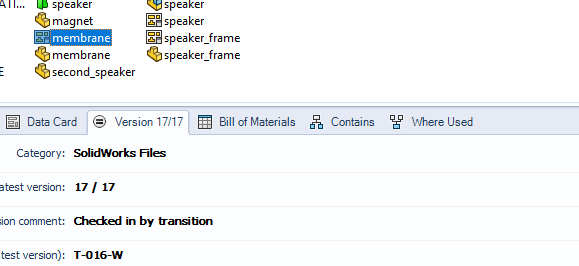
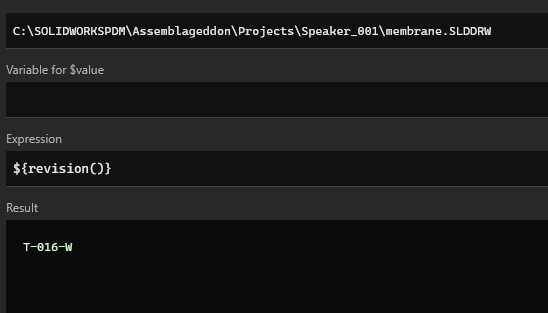
Use ${revision()} when you need the current full revision display value. PDMShell formats the result using the active PDM revision scheme, so formatted components such as letters and zero-padded numbers are preserved.
${revision()}
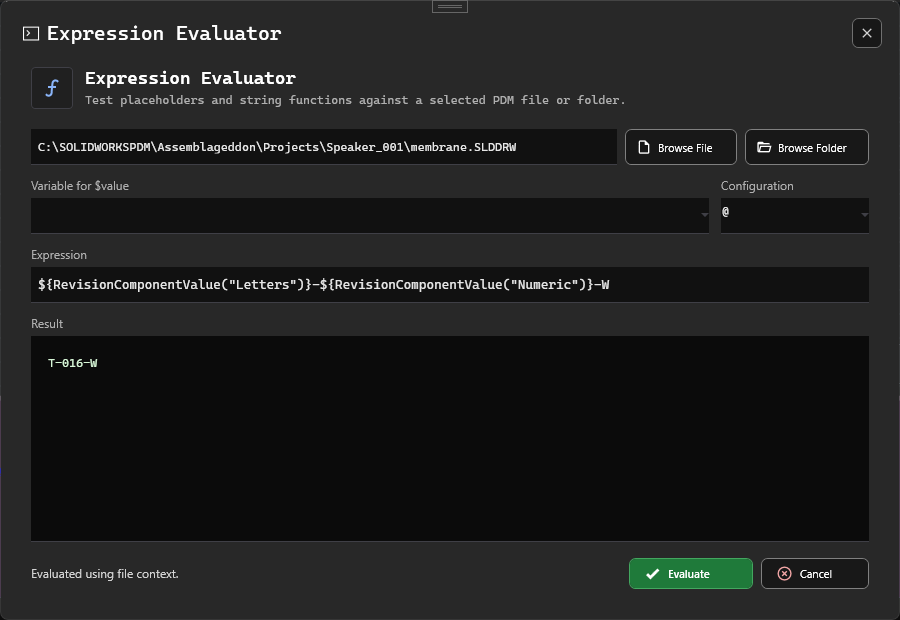
Use component functions when you need to rebuild or inspect only part of the revision. In this example, the revision scheme has Letters and Numeric components. The current component values evaluate to T and 016, producing T-016-W.
${revisionComponentValue("Letters")}-${revisionComponentValue("Numeric")}-W
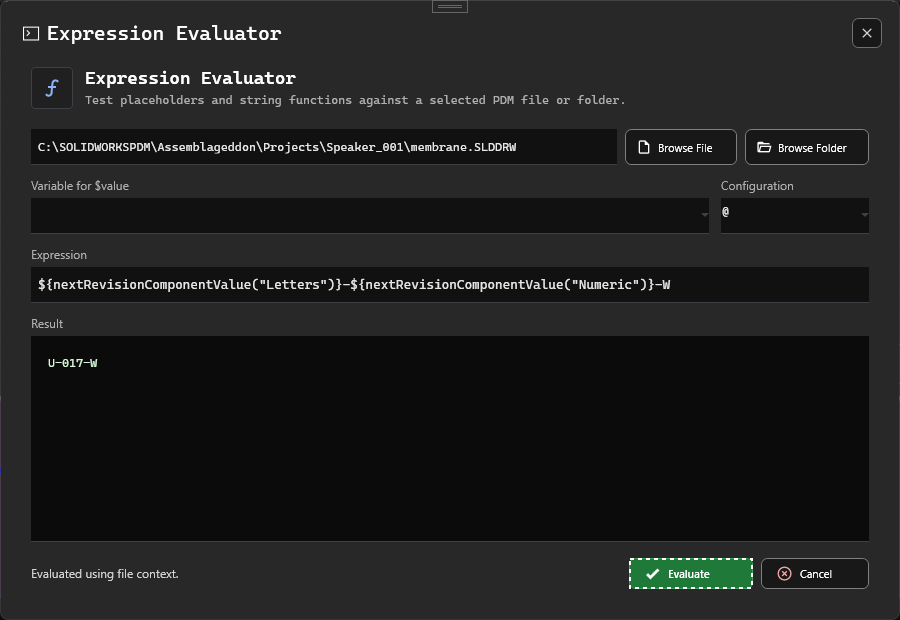
Use nextRevisionComponentValue when you need to preview the next formatted component values without changing the file. In the same scheme, the next values evaluate to U and 017, producing U-017-W.
${nextRevisionComponentValue("Letters")}-${nextRevisionComponentValue("Numeric")}-W
Revision function names are case-insensitive, but the documentation uses lowercase names for consistency.
Context Reference
Use this table when you are not sure which context an expression needs.
| Expression Type | Best Context | Notes |
|---|---|---|
$fileName, $filePath, $extension, $version |
PDM file | These depend on a selected file. |
$state, $stateID, $workflow, $workflowID |
PDM file | These read workflow information from the selected file's current state. |
$folderPath, $folderName, $directory, $folderID |
PDM folder | These depend on a selected folder. |
$id |
PDM file or folder | Returns the selected file ID for file context, or folder ID for folder context. |
$(Description.@) |
PDM file | Reads the file variable from the @ tab. An explicit suffix avoids relying on the file-type default. |
$(Project) |
PDM folder | Reads a folder variable. Folders do not use file configurations. |
$value with Sample text |
Any context or no context | Uses the text typed in the evaluator. |
$value with PDM variable |
PDM file or folder | Reads the selected data card variable from the selected context. |
${revision()} and ${nextRevision()} |
PDM file | Revision functions need file context because folders do not have file revisions. |
${revision("C:\Vault\File.pdf")} |
Any context if logged in | The function resolves the supplied file path directly. |
$vaultName, $vaultRootFolder |
Any context if logged in | These come from the logged-in vault. |
$date, $time, $guid, $tempFolder |
No context required | These values do not depend on a selected file or folder. |