Event trigger points
Trigger points run scripts in response to PDM command events. Use them when automation should happen before or after a PDM operation.
Supported trigger areas
| Area | Trigger points |
|---|---|
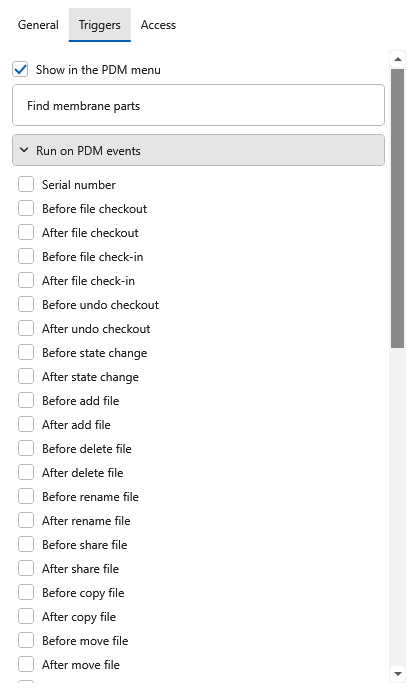
| File lifecycle | Before/after checkout, check-in, undo checkout, get, add, delete, rename, move, copy, and share |
| Workflow | Before/after state change |
| Folders | Before/after add folder, delete folder, rename folder, move folder, and copy folder |
| Labels | Before/after label, label delete, label modify, and label add item |
| Cards and selection | Card button, select item, and deselect item |
| Serial numbers | Serial number |
Pre-event behavior
For pre-event trigger points, a script failure can cancel the PDM command when the add-in receives the event early enough for PDM to cancel it.
Saving trigger changes
In the 4.0.80 main editor, open Script settings > Triggers, expand Run on PDM events, and choose the trigger points. Save publishes these changes with the vault script. The add-in itself no longer hosts an editor.
PDMShell reports when PDM Explorer must restart to refresh registration. SOLIDWORKS PDM registers command hooks when the add-in loads, so restart PDM Explorer as directed before expecting changed hooks to run.
Command data
PDM event data depends on the command type. Some events provide files, some provide folders, and some provide command-specific values such as card button text or configuration context.