addtovault
Description
The addtovault command adds one or more files from disk to the SOLIDWORKS PDM vault. It supports single files, folders, and CSV mapping files. Additional options allow batch processing, filtering, ignoring existing files, updating references, and exporting results.
Note
It is highly recommended that you run PDMShell as Administrator before using this command.
Syntax
addtovault [-source <path> | -map <csvPath>] [-skip] [-count] | [-directory <Vault or outside directory>] [-search <pattern>] [-recursive] [-batch <size>] [-ignoreexisting] [-updaterefs] [-csv <outputPath>] [-propertymap] [-clear] [-label]
Parameters
| Parameter | Required | Description |
|---|---|---|
-source |
No | Specifies the source file or directory to be added to the vault. |
-map |
No | Specifies a CSV file containing file mapping information. |
-skip |
No | Optional. |
-count |
No | Optional. |
-directory |
No | Specifies the destination folder in the PDM vault. |
-search |
No | Optional. |
-recursive |
No | Optional. |
-batch |
No | Optional. |
-ignoreexisting |
No | Optional. |
-updaterefs |
No | Optional. |
-csv |
No | Optional. |
-propertymap |
No | A csv file path containing a list of files and their properties. Use DocManProps to generate a list and edit in excel. |
-clear |
No | Optional. |
-label |
No | Optional. |
Parameter Details
source: Specifies the source file or directory to be added to the vault.
Supports:
• Single file
• Folder
If a folder is specified, files can be filtered using -search and -recursive.
If not specified, the current working directory is used.
map:
Specifies a CSV file containing file mapping information.
The CSV must contain two columns (First row is header):
Column 1: Full source file path
Column 2: Destination folder path relative to the target vault directory
Example CSV:
FilePath,Target
C:\Data\Part1.sldprt,ProjectA\Mechanical
C:\Data\Part2.sldprt,ProjectB\Mechanical
With -map, you skip a specified number of items using -skip to start from a starting index in your map file. You can limit the number of items to process using the -count.
#uses a map file and starts from the index 5234 only processing 540 mappings
addtovault -map "C:\Users\hawkridge\Downloads\map\map.csv" -batch 50 -propertymap "C:\Users\hawkridge\Downloads\map\property.csv" -skip 5243 -count 540 -clear -ignoreexisting -csv "result.csv"
This parameter overrides -source.
skip:
(Optional)
Number of rows to skip from the map CSV file before processing begins. Header row is not included in this count.
count:
(Optional)
Maximum number of rows to process from the map CSV file after applying the skip value.
Important
Please make sure you don't have duplicates copies to the same target directory.
directory:
Specifies the destination folder in the PDM vault.
If not specified, the current vault directory is used.
Example:
-directory "Projects"
search:
(Optional)
File Explorer search pattern used to filter files when -source is a folder.
Supports:
• Wildcards (*)
• Multiple extensions
• Separators: , ; |
Examples:
-search "*.sldprt"
-search "*.sldprt;*.sldasm"
recursive:
(Optional)
Includes all subfolders when the source is a folder.
If not specified, only the top-level folder is processed.
batch:
(Optional)
Specifies the number of files to add per batch.
This improves performance and stability when adding large numbers of files.
Examples:
-batch 50
-batch 100
If not specified, all files are added in a single batch.
Important
Please use a batch size when processing large directory +1000 files. We recommend a batch size of 100.
ignoreexisting:
(Optional)
Ignores files that already exist in the vault. Prevents duplicate additions and overwriting.
updaterefs:
(Optional)
Updates file references after files are added.
This is recommended when migrating SOLIDWORKS assemblies to ensure references point to the correct vault locations.
label:
(Optional)
Adds a label to the migrated files. This is a great option to mark the added files immediately.
#Add files from a map (skip first 10 and only process 3) and add a label migration name and value
addtovault -map "C:\export\map.csv" -skip 10 -count 3 -label "Migration;Migration"
# addtovault
search -search "Name=%.sldprt;Label=Migration;Recursive=true"

clear:
(Optional)
Clears existing properties from the file before applying propertymap.
csv:
(Optional)
Exports the results of the add operation to a CSV file.
Example:
-csv "C:\Reports\add_results.csv"
propertymap: A csv file path containing a list of files and their properties. Use DocManProps to generate a list and edit in excel.
-csv "C:\Reports\propertymap.csv"
You only need the columns that marked in red:
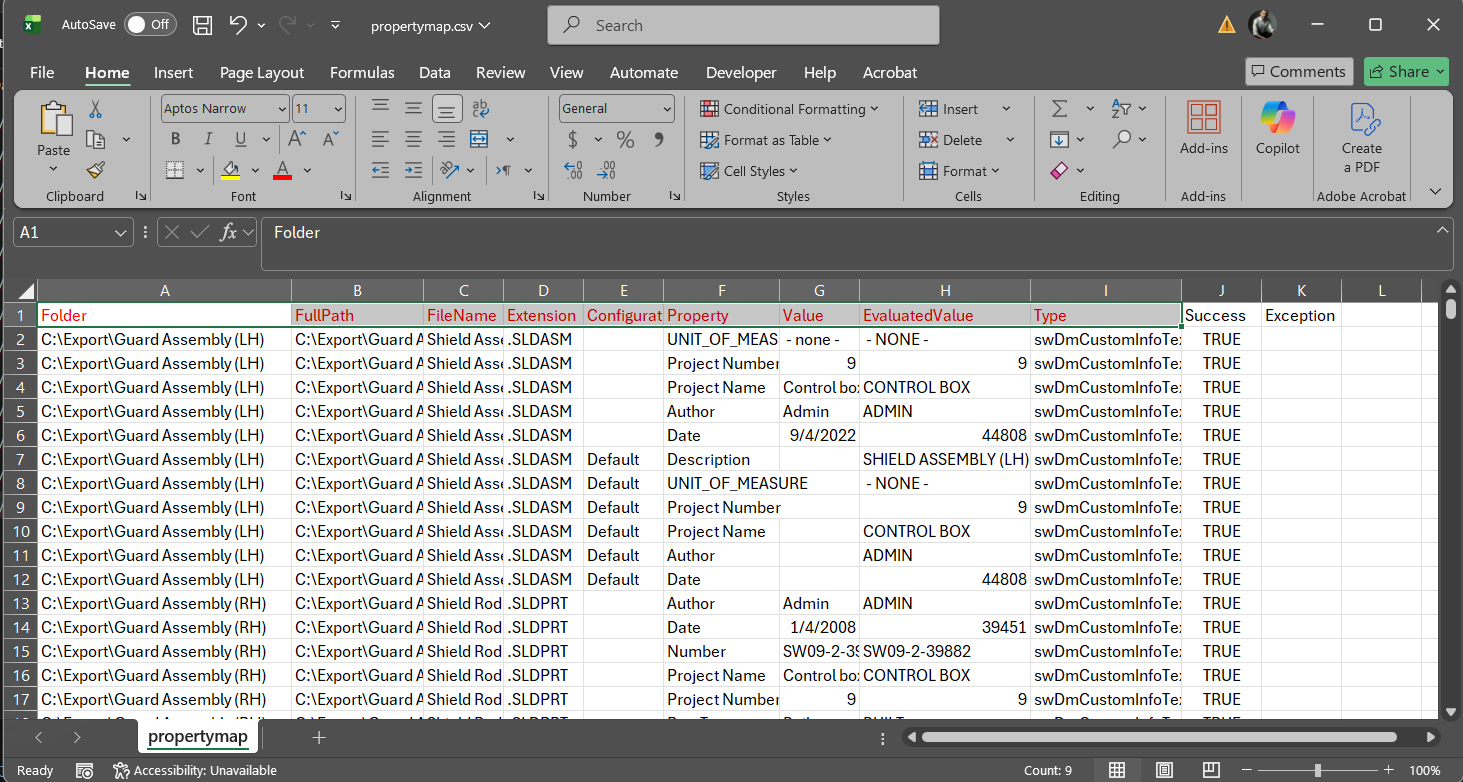
Important
If you specify the word "DELETE" as the value, PDMShell will delete that property from in the migrated file during the add operation. The original file will not be affected.
If you specify -clear, PDMShell will clear all the properties from the file before adding it to the vault and prior to apply the property map.
Examples
Adds a single file to the current vault directory:
addtovault -source "C:\Projects\file.txt"
Adds all parts and assemblies recursively:
addtovault -source "C:\Projects" -recursive -search "*.sldprt;*.sldasm"
Adds files using a CSV mapping file in batches of 50:
addtovault -map "C:\Projects\mapping.csv" -batch 50
Adds files and exports results:
addtovault -source "C:\Projects" -recursive -csv "C:\Reports\results.csv"
Adds files and updates references:
addtovault -source "C:\Migration" -recursive -updaterefs
Adds files to a specific vault folder:
addtovault -source "C:\Projects" -directory "Projects"
Add files from a map CSV (50 at a time) and save the results to ret.csv, while ensuring properties are updated using a property map CSV file. This also performs a search and ignores files that already exist in the vault.
addtovault -map "c:\export\map.csv" -ignoreexisting -csv "ret.csv" -batch 10 -propertymap "c:\export\propertymap.csv"
Remarks
• Files are left checked out after being added.
• Use checkin command to check in files after adding.
Example:
checkin -search % -recursive
• Batch processing is strongly recommended for large migrations.
• The ignoreexisting parameter prevents duplicate files from being added.
• The updaterefs parameter should be used when adding SOLIDWORKS assemblies.
• Ensure you have sufficient vault permissions before running this command.
• The map parameter overrides source if both are specified.
Note
It is recommended to perform large add operations in stages and verify results using the exported CSV report.
Availability
Available since PDMShell 2.0.0.