Run PDMShell Scripts from Dispatch
When you want to run PDMShell scripts from Dispatch, you can use the Shell Command action.
DID YOU KNOW?
The PDMShell add-in can run PDMShell scripts from PDM right-click menus and event trigger points. It covers the same kind of automation you would normally build with Dispatch, and adds permissions, conditions, placeholders, command menu scripts, trigger points, headless execution, and the visual script editor.
Shell Command Settings
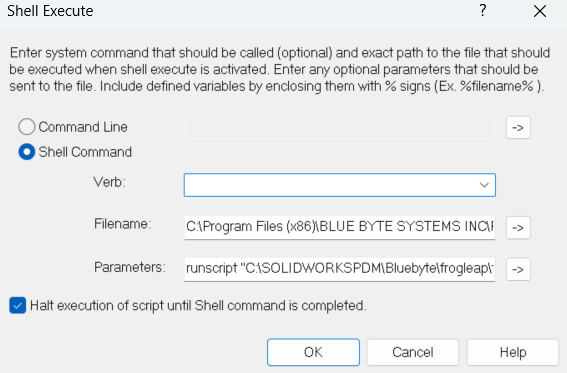
- Verb: Leave this field empty.
- Filename: Specify the path to the PDMShell executable, which is
pdmcli.exe.
Note
Do not wrap the path in quotes (""), even if it contains spaces.
- Parameters: For current PDMShell versions, use the following format:
runscript -source "pathToScript" -filePath "%PathToSelectedFile%"
- The script path must be wrapped in quotes (
"") if it contains spaces. - Use
-filePath "%PathToSelectedFile%"when the Dispatch action is running against the selected PDM file. - Inside the script, use PDMShell file placeholders such as
$localPath,$fileName,$fileNameWithoutExtension,$extension,$folderPath, and PDM variable placeholders.
Example: Dispatch Shell Execute Configuration
Verb:
Filename: C:\Program Files (x86)\BLUE BYTE SYSTEMS INC\PDMShell\PDMCLI.exe
Parameters: runscript -source "C:\Scripts\checkin-selected-file.pdmshell" -filePath "%PathToSelectedFile%"
Example script:
In the PDMShell script (checkin-selected-file.pdmshell), reference the selected file with $localPath:
# Check out the selected file.
checkout -filePath "$localPath"

# Save changes.
checkin -filePath "$localPath" -comment "Checked in from Dispatch"

# Required when running from Dispatch or another external automation host.
quit
Passing Extra Dispatch Values
Warning
Positional Dispatch values such as $parameter1$ and $parameter2$ are legacy behavior and should not be used with PDMShell 4.0.6 or later. Starting with PDMShell 4.0.6, runscript should receive context through -filePath, -items, or -search, and scripts should use PDMShell placeholders such as $localPath instead.
Older scripts may use the positional argument format to pass Dispatch-only values such as %OldVersion%:
Verb:
Filename: C:\Program Files (x86)\BLUE BYTE SYSTEMS INC\PDMShell\PDMCLI.exe
Parameters: runscript "C:\Scripts\frogleap.pdmshell" "%PathToSelectedFile%" "%OldVersion%"
In this legacy format, the script used $parameter1$, $parameter2$, and so on:
# Check the selected file out.
checkout -filePath "$parameter1$"

# Frog leap to the specified old version.
frogleap -filePath "$parameter1$" -oldVersion "$parameter2$"

# Save changes.
checkin -filePath "$parameter1$" -comment "Prompted version $parameter2$"

# Required when running from Dispatch or another external automation host.
quit
For current PDMShell versions, use the -source and -filePath format shown above. If you need a Dispatch value that is not available as a PDMShell placeholder, write it to a PDM variable, pass a selected file with -filePath, or move the automation to the PDMShell add-in where command context and conditions are available.
Tutorial
Tips for Running PDMShell Scripts from Dispatch
- Test Your Scripts: Always test your PDMShell scripts independently before integrating them with Dispatch.
- Use Quotes for Paths: Wrap paths and parameters in quotes (
"") if they contain spaces to avoid errors. - Use
quitat the end of scripts launched from Dispatch so the external PDMShell process closes after the script runs.